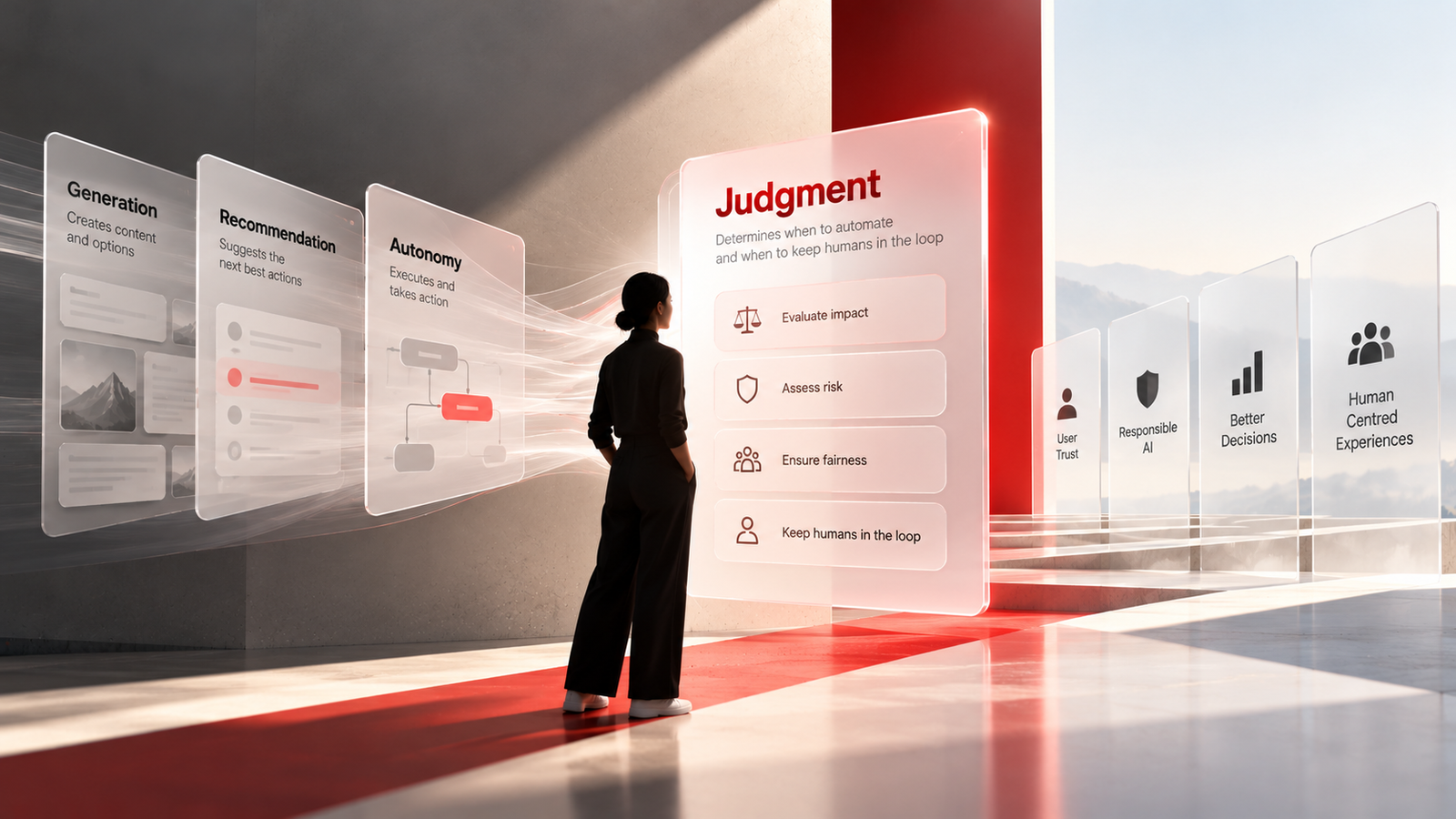
The Judgment Layer: How UX Design Is Becoming the Governance Layer for AI
There's a quiet revolution happening in UX design, and most organizations haven't noticed it yet.
The revolution isn't about AI-generated interfaces, auto-layout magic, or prompt-driven prototyping — though all of those are real and accelerating. The revolution is this: the most important UX design decisions in 2026 are no longer about how a screen looks or behaves. They're about what we allow the system to decide on behalf of the user.
This is the emergence of what Jonathan Walter, writing in UX Matters in April 2026, calls the Judgment Layer — the fourth and most critical layer in AI-enabled systems, where humans must determine when automation is appropriate and when it isn't.
And it's fundamentally redefining what it means to be a UX designer.
The Four Layers of AI-Enabled Systems
To understand why the Judgment Layer matters, consider the four layers that are emerging in AI-enabled systems:
- Generation — Produces content, wireframes, mockups, even working code. (AI handles this.)
- Recommendation — Suggests the next actions, prioritizes information, surfaces options. (AI handles this.)
- Autonomy — Executes decisions, initiates workflows, takes action. (AI handles this.)
- Judgment — Determines when automation is appropriate, what requires human oversight, and where the human must remain in the loop. (This remains deeply human.)
The first three layers are increasingly automated. The fourth is where UX designers are becoming indispensable — not as pixel-pushers, but as architects of decision boundaries.
As Walter puts it: "UX designers are uniquely qualified to shape the judgment layer because it requires balancing competing concerns such as user goals, organizational risk tolerance, ethical implications, cognitive load, and trust calibration."
This is a profound shift. For decades, UX design practice centered on shaping user interfaces — workflows, layouts, interaction models, information architectures. Now, the center of gravity is moving upstream.
From Frictionless to Purposeful Friction
For years, UX design orthodoxy celebrated friction reduction. "The best interface is an invisible interface." We optimized for speed, efficiency, seamlessness. We wanted the UI to "get out of the user's way."
AI complicates this principle in a fundamental way.
When systems begin making probabilistic decisions — when the AI recommends a medical treatment, approves a loan, or auto-generates a legal document — removing friction entirely introduces greater risk and uncertainty. Sometimes, the right design decision is to add friction.
Walter identifies three forms of what he calls "protective friction":
- Reflection friction — Prompts users to confirm consequential decisions before they're executed.
- Transparency friction — Reveals how a system arrived at a recommendation, making the reasoning visible.
- Accountability friction — Makes visible who or what is responsible for an outcome.
This isn't resistance to automation. It's calibration. The goal is alignment between system capabilities and human expectations.
Consider the stakes: A 2025 Pew Research Center study found that 52% of workers report feeling worried about AI's future impact in the workplace, with only 6% believing AI will create more job opportunities long-term. When systems make decisions that affect people's lives, the UX designer's job is no longer to make the experience seamless — it's to make it trustworthy.
Designing for Probabilistic Systems
Historically, software behaved deterministically. Click a button, get a predictable result. AI systems break this contract. They generate outputs probabilistically, convey confidence levels rather than guarantees, and — critically — often present information in overtly confident ways even when uncertainty is high.
This means UX designers are no longer just designing workflows, screens, and navigation models. We're now designing:
- Decision boundaries — Where does the system's authority end and human judgment begin?
- Confidence thresholds — What level of certainty is required before automation should occur?
- Escalation paths — When and how does the system hand off to a human?
- Intervention mechanisms — How can users override, question, or redirect the system?
The questions UX designers must answer have shifted from "How should this interface behave?" to:
- When should the system suggest versus decide?
- When should the system ask for permission?
- What level of confidence is necessary before automation should occur?
- How do we help users understand what the system did, why it did it, how confident it was, and how to change the outcome?
These questions extend beyond usability into governance.
The Rise of Context-Based Design (And Its Trust Problem)
Parallel to the Judgment Layer evolution, context-based UI design is transforming how interfaces adapt in real time. As Navghan Modhavadiya documented in UX Matters in April 2026, modern digital experiences now analyze users' environment, behaviors, and intentions in real time to deliver immediate, personalized assistance.
The examples are everywhere: Netflix recommendations based on viewing habits, Google Maps updating routes in real time, Figma displaying contextual editing panels based on what you've selected. This is context-based UI design — and it's no longer a differentiator. It's becoming the foundation.
But here's the tension that Modhavadiya's research reveals:
- 82% of users prefer software with interfaces that adjust based on their current task.
- 65% of users feel uncomfortable when applications use their real-time data (location, time, behavioral data).
- 70% of users will skip contextual features if they slow down page loads.
- 92% of users want full control — the ability to enable or disable features — rather than pure automation.
The lesson is clear: users value intelligent experiences not because of what the system can do, but because it helps them without getting in their way. The moment contextual design feels like surveillance, trust evaporates.
Modhavadiya identifies the core design principle: "Adaptive UX design succeeds in scenarios where the intelligence supports users' intentions without overriding them. It reinforces users' confidence rather than replacing human control."
This is the Judgment Layer in action at the interface level — determining not just what the system should do, but how visibly it should do it.
Composable Ecosystems and the Death of Fixed Boundaries
There's another structural shift compounding the complexity: the move from monolithic, vendor-controlled applications to composable, interoperable ecosystems.
Walter describes this as "planning for composition in an era of open, interoperable systems." Rather than a single provider owning the full experience surface, value is increasingly created through modular platforms where customers, partners, and intelligent agents compose solutions dynamically.
This is already visible in API-first architectures, open standards for AI agents, and the growing availability of AI-assisted development tools. People can now use natural-language programming to assemble personal dashboards that integrate data from multiple platforms — often without the original vendors' direct involvement.
For UX designers, this means you can no longer assume a fixed application boundary or a fully knowable set of user journeys. Your design might be consumed by tools, agents, or systems you'll never see or control.
Walter offers critical guidance for this new reality:
- Design data as a user interface. Every exposed data object is a user-facing artifact with meaning and intent.
- Name for human understanding. Use real-world concepts, not internal jargon.
- Expose context with the value. Include metadata — freshness, confidence, source, assumptions.
- Make constraints explicit. Document what should not be compared, combined, or inferred.
- Design for reuse, not completion. Assume your data or capability will be extracted and remixed outside its original workflow.
- Assume unknown orchestrators. Design as if tools you'll never see will consume your work.
This is UX design at the architectural level — participating in schema design, API contracts, and architectural reviews. It's a far cry from choosing button colors.
Figma's MCP Play: Bridging Design and Code Context
The tooling landscape is evolving to match these structural shifts. Figma's recent push into MCP (Model Context Protocol) illustrates the direction. As Emma Webster described in Figma's April 2026 blog, Figma's MCP server brings design decisions directly into the tools where code gets written — so what gets built actually matches what was designed.
This is significant because one of the persistent failures in AI-assisted development has been context loss. AI coding agents generate code that looks right but doesn't match the design intent. By piping design system tokens, component definitions, and design rationale directly into the coding environment via MCP, Figma is attempting to close the gap between design intent and implementation reality.
Figma's broader AI toolkit — Make (AI prototyping), Weave (AI-assisted visual design), and MCP integration — represents a new class of design tools that don't just accelerate production but embed design intelligence into the entire product development pipeline.
The implication for UX designers: your design system is no longer just a library of components. It's becoming a source of truth for AI agents that will increasingly participate in building products.
From Designer to Governance Architect
Let's step back and look at the macro pattern.
The UX profession is in the middle of a transition that mirrors what happened in other fields when automation arrived. When spreadsheets automated accounting, accountants didn't disappear — they became financial strategists. When CAD automated drafting, architects didn't disappear — they became spatial designers.
Similarly, as generative AI automates interface production, UX designers are becoming governance architects — professionals who define:
- Which decisions can be safely automated
- Which decisions require human oversight
- Which decisions require human discretion
- How much autonomy systems should possess
- When to notify users of system actions
- How to surface system errors
- How to structure accountability
These are not purely technical questions. They involve understanding context, consequences, and tradeoffs. This is where UX design increasingly intersects with organizational governance, ethics, and risk management.
The 2025 Pew Research data underscores the urgency: workers are anxious about AI, and that anxiety is warranted when systems make consequential decisions without visible human oversight. UX designers are the professionals best positioned to ensure that AI systems support rather than supplant human judgment.
What This Means for UX Designers in 2026
The skill set is shifting. Here's what's becoming essential:
1. Decision Architecture — The ability to map decision boundaries, confidence thresholds, and escalation paths. Not just "what does the user see?" but "what is the system allowed to decide?"
2. Trust Calibration — Understanding how to build and maintain user trust in probabilistic systems. This means designing transparency mechanisms, confidence indicators, and override capabilities.
3. Systems Thinking — Designing for composable ecosystems where your work will be consumed by agents and systems you don't control. This means thinking in terms of APIs, data contracts, and schema design.
4. Protective Friction Design — Knowing when to add friction and when to remove it. The old heuristic of "reduce friction" is now context-dependent.
5. AI Literacy — Understanding how AI systems work, their failure modes, and their confidence characteristics. You can't design the judgment layer if you don't understand what you're judging.
6. Governance and Ethics — Participating in organizational decisions about AI autonomy, accountability structures, and ethical boundaries.
The Next 2-3 Years: Predictions
Based on the trajectory we're seeing, here's what I expect:
By 2027: Every major product organization will have a "Judgment Layer" design practice — a formal process for determining which decisions AI can make autonomously and which require human oversight. This will be as standard as having a design system today.
By 2027: "Decision Architect" or "AI UX Governance Designer" will emerge as distinct job titles, separate from traditional UX design roles. These professionals will sit at the intersection of design, ethics, and organizational risk management.
By 2028: Design systems will evolve from component libraries into "decision system libraries" — codified patterns for confidence thresholds, escalation paths, transparency mechanisms, and accountability structures that can be reused across products.
By 2028: Regulatory frameworks (similar to GDPR for data privacy) will emerge for AI decision-making transparency, and UX designers will be the primary implementers of compliance at the interface level.
Ongoing: The tension between personalization and privacy will intensify. Context-based design will become more powerful and more controversial. The designers who thrive will be those who can deliver intelligent experiences while giving users genuine control.
Conclusion: The Opportunity
AI changes the surface of UX design work, but it reinforces and even reshapes the underlying purpose of the profession. UX designers have always helped organizations make better decisions about how technology should serve human needs. AI simply introduces a new form of ambiguity — and with it, an opportunity.
The designers who will thrive in this new landscape are those who move upstream: from crafting screens to defining boundaries, from reducing friction to calibrating it, from designing interfaces to designing governance.
The Judgment Layer is where the most important UX work in a generation is happening. And it's waiting for designers who are ready to step up.
References
- Walter, J. (2026, April 20). Designing the Judgment Layer: How UX Governs AI Autonomy. UX Matters.
- Modhavadiya, N. (2026, April 20). Adaptive, Context-Based Design Is Transforming the User Experience. UX Matters.
- Yocco, V. (2026, April 20). Learned Helplessness in AI-Assisted Work: When Users Stop Trying to Shape the Tools They Use. UX Matters.
- Ashfaq, M. (2026, May 4). How AI Can Improve the UX of Government and Public Service Web Sites. UX Matters.
- Sharma, O. (2026, May 4). User Onboarding Excellence: The Secret to Driving Long-Term Product Success. UX Matters.
- Webster, E. (2026, April 16). The TL;DR on MCP: Why Context Matters and How to Put It to Work. Figma Blog.
- Hogan, A. (2026, April 22). How AI Leaders Are Borrowing from the Design Playbook. Figma Blog.
- Schiff, I. & Köhler, K. (2026, April 9). Turning Prompts into Five Scalable Workflows with Figma Weave. Figma Blog.
- Smit, B. & Burke, D. (2026, April 2). Build with More Context and More Control in Figma Make. Figma Blog.
- Okun, C. (2026, April 28). FigJam Is Now Your Coding Agent's Whiteboard Too. Figma Blog.
- Pew Research Center. (2025). Worker Attitudes Toward AI in the Workplace.
- Jobs for the Future. (2025). AI and Economic Opportunity: Shifting Worker Sentiment.
- Nielsen Norman Group. (2025). AI Tools in UX Design: Capabilities and Validation Requirements.
- Seligman, M. (1967). Learned Helplessness: A Theory of Psychological Reactance.
- Medium. (2026, May 10). UX Design Trending Topics. Medium RSS Feed.
- Medium. (2026, May 10). Design Systems Trending Topics. Medium RSS Feed.
- Medium. (2026, May 10). Artificial Intelligence Trending Topics. Medium RSS Feed.
Was this article helpful?
Earn Design Maestro badge and 22 XP reward
The Judgment Layer: How UX Design Is Becoming the Governance Layer for AI Quiz
Sign in to attempt this quiz and earn Xperience XP.
Login to Attempt Quiz